
For agency owners
A TikTok LIVE agency management app, built for the owner
CN Creator App is an app for the person who runs a TikTok LIVE talent agency. Connect the TikTok Backstage account the agency already has and it reads each creator's monthly figures (diamonds, valid days, LIVE hours and more) into one roster. You set what each level pays and the pay formula, decide what each member of staff sees, and give every creator a view of their own month. It never takes, sends or holds the money.
On this page
This page is for agency owners and staff who are deciding whether an app can run the agency better than a spreadsheet. It says what the app does, shows the screens, compares it plainly with Excel, WhatsApp and Backstage on its own, and answers the questions owners ask first.
What you can do as the owner
Each row is a job an owner does every month, and what the app does about it.
| The job | What you do in the app |
|---|---|
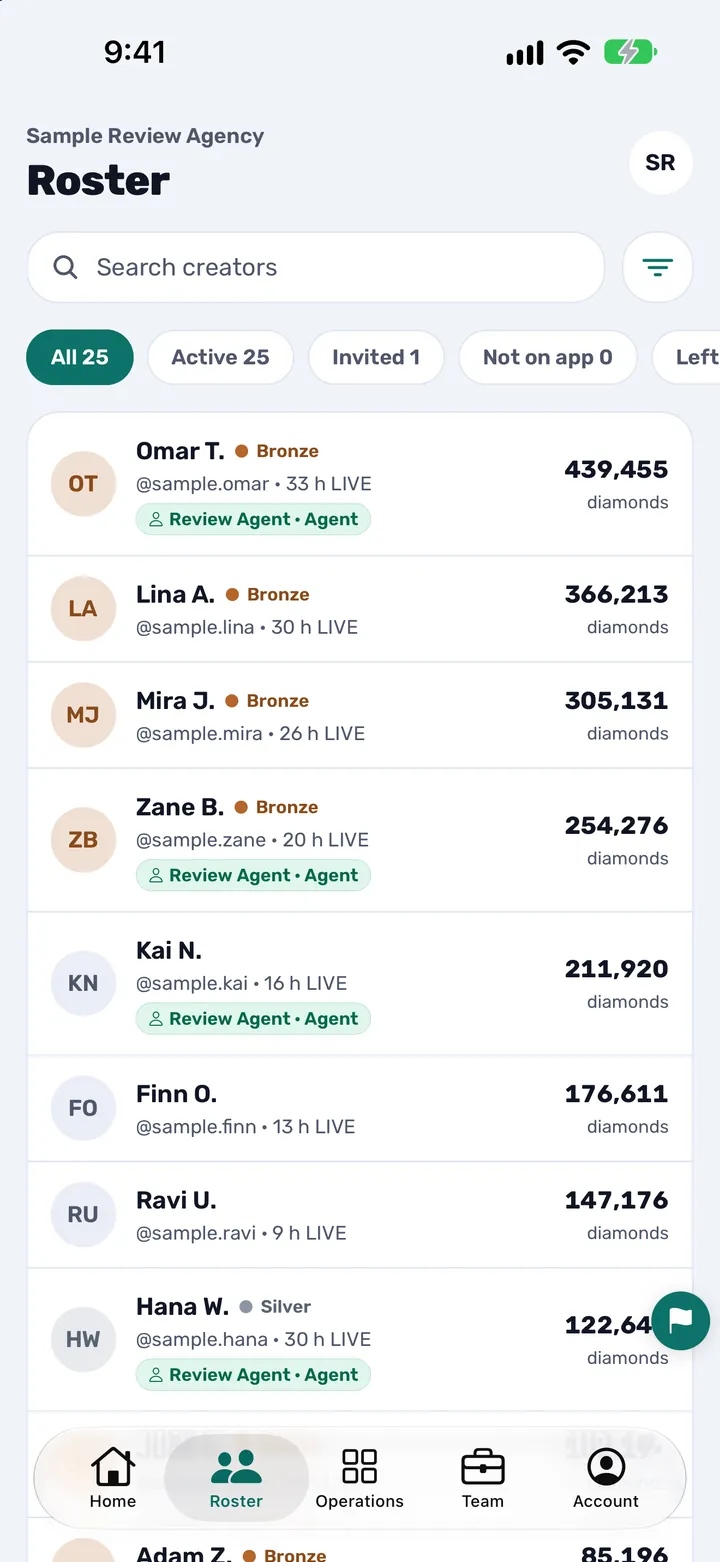
| See every creator in one place | One roster with each creator's month and the agent who looks after them. Search and filter it, select creators in bulk and assign them to agents. |
| Know how each creator did this month | Diamonds, diamonds from matches, valid days, LIVE duration, number of LIVEs, new followers and PK matches, per creator and per month, read from your own Backstage account. |
| Set levels and pay rules | Five activeness levels (TikTok fixes the gates; you set what each level pays), and pay rules that follow either the levels or the diamonds. You see the result priced against a real creator's month before you publish it. |
| Keep the record of what is owed | Every month lands in a ledger of who is owed what. The app works out what is owed; you pay people, outside the app, the way you already do. |
| Run your team | Owner and agent roles, permissions set per person (including whether an agent sees pay), a Backstage login per member of staff, and a join code with an approval queue. |
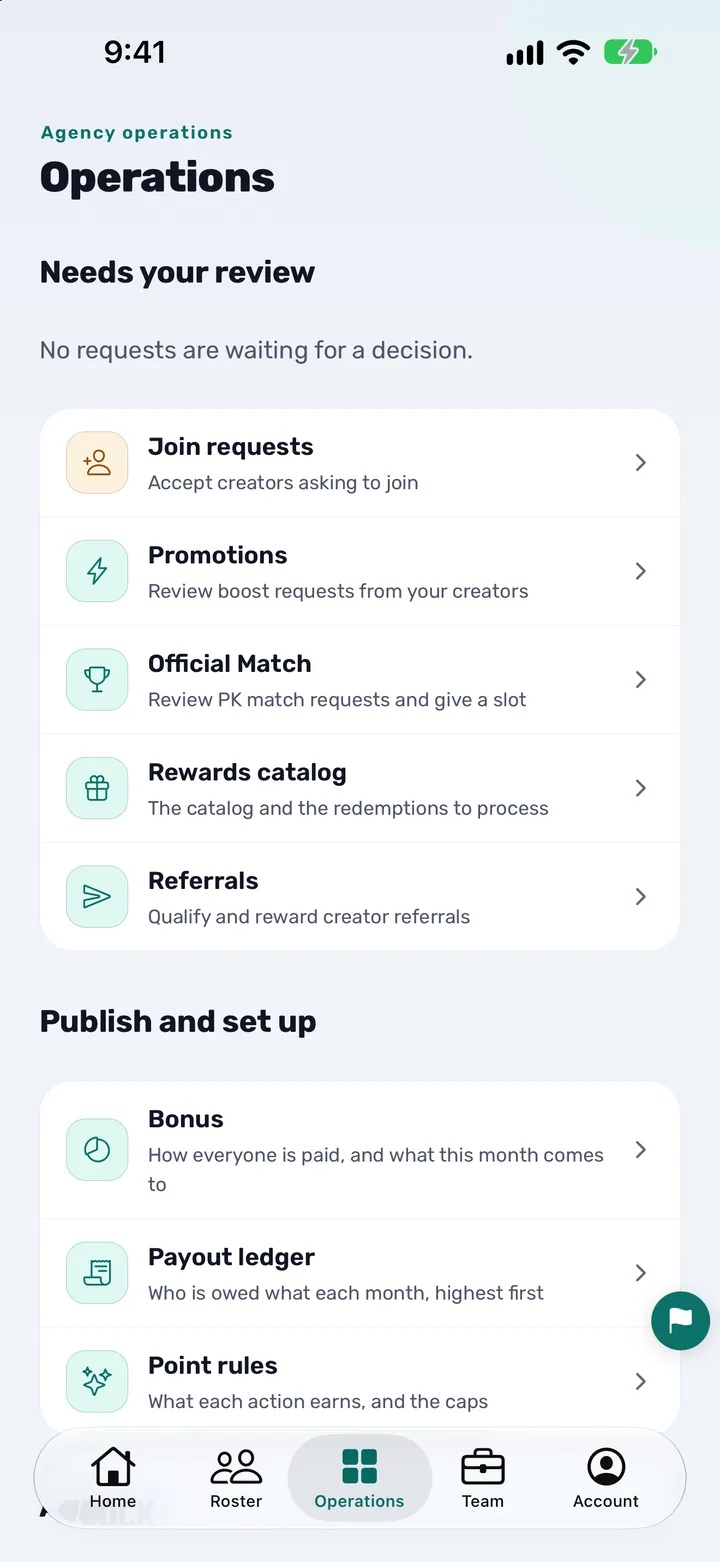
| Answer creators | Requests, appeals and join applications arrive in queues, each with a decision attached. Announcements go to the whole agency or a chosen audience. |
| Bring creators in | Invitations, a join link with your approval, creators who sign in with TikTok and claim a matching row, and referrals that staff check. |
| Set up quickly | An optional AI setup assistant, and an Excel or CSV import that shows what it matched and saves nothing until you have checked it. |
The screens you will use most
These are real screens of a sample agency in the app, not mock-ups. The Roster is where an owner starts the day. Operations is where the queues and the publishing of bonus and payout live.
Who it is for
CN Creator App is for TikTok LIVE talent agencies: the companies that sign LIVE creators, look after them through TikTok LIVE Backstage and reward them each month. Any agency can open its own workspace. Creators do not sign up on their own; they join the agency they already work with.
- The owner Sees the whole agency and decides what each member of staff can see and do. This page is written for you.
- Agents (staff) Each agent works the creators assigned to them, through their own Backstage login. You decide what an agent can see and do, including whether they can see pay.
- Creators Each creator sees their own figures, their level and what the month comes to under your rules, and nothing about anybody else.
Compared with Excel and WhatsApp
Many agencies run the month from a Backstage export pasted into a spreadsheet, with creators and staff reached through WhatsApp groups. It works, and the app does not pretend otherwise. This is where the two routines differ.
| Task | Spreadsheet and WhatsApp | CN Creator App |
|---|---|---|
| Getting the month's figures | An export copied in at month end | Read from your own Backstage account automatically, on a regular schedule |
| A figure nobody read | An empty cell, or a zero | A dash, never a zero |
| Working out what each creator is owed | Formulas copied from tab to tab | One formula you set, priced against a real creator's month before you publish it |
| Who sees what | Whoever has the file sees everything | Permissions set per person, including who sees pay |
| What a creator sees | Whatever is sent to them in a message | Their own month in the app, with the same figures the agency sees |
| Requests, appeals and join applications | Direct messages and group chats | Queues, each with a decision attached |
| Announcements | A message in a group chat | A post to the whole agency or a chosen audience, with a view of who has not opened it |
| Recording what is owed | A column in a sheet | A ledger of who is owed what, month by month |
| A Backstage login that stopped working | You find out from a creator | A needs-attention row at the top of the owner's Home |
When a spreadsheet is still enough
If the agency has only a few creators, you are the only person who ever looks at the numbers and nobody else needs to see their own month, a spreadsheet can be enough for now. The app earns its place when several people touch the figures: agents who each look after their own creators, creators who ask where they stand, and a pay formula that has to give the same answer every month.
You do not have to start over. An Excel or CSV file can be imported: the app reads the columns and the month, shows what it matched, and saves nothing until you have checked it. A Backstage Creator data export works best.
Compared with Backstage on its own
TikTok LIVE Backstage is where TikTok shows an agency its creators' figures, and it stays the source. The app does not replace Backstage: it reads from the Backstage account you already use, read-only, and never posts, changes or buys anything on TikTok.
What the app adds is the part that belongs to your agency and not to TikTok: the levels and pay rules you set, the ledger of what each creator is owed, roles and permissions for your staff, queues for requests and appeals, announcements, and a view for each creator of their own month.
This is not done through an official TikTok API. Whether your agreement with TikTok allows a connected service is the agency's decision.
Levels and pay: your rules, not ours
The app has no pay numbers of its own. You set what each level pays, then pay rules that follow either the levels or the diamonds, and every agency sets its own. Before you publish, you see the result priced against a real creator's month, so a rule that does not do what you meant shows up before a creator sees it.
The app works out what each creator is owed under your rules and keeps the ledger. It never takes, sends, holds or processes the money between an agency and its creators, and it links to no payment service for it.
What it is not
- Not a payment service. It never takes, sends, holds or processes the money between an agency and its creators.
- Not a TikTok product. It is made by an official TikTok LIVE agency partner and TikTok games partner, and it works with your own Backstage account. TikTok and TikTok LIVE are trademarks of ByteDance Ltd.
- Not a way to get figures you do not already have. It reads the Backstage account the agency already has. No account, no figures.
- Not a violation tracker. It does not detect TikTok violations or deduct penalties. A creator can raise a problem with their agency as an appeal.
- Not for creators to sign up alone. A creator joins an agency that already uses it.
How to get started
- Install the app. Download CN Creator App from the App Store or Google Play.
- Open your agency. On the Agency tab, tap "I am starting an agency" and confirm your email with the code you are sent. It takes about a minute, with no application and no approval to wait for.
- Connect Backstage. Sign in with the TikTok Backstage account the agency already uses. The first read of the roster starts on its own and may take a while.
- Bring your team and creators in. Send invitations, or share the agency's join link and approve people from the queue. You can also import a spreadsheet.
- Set the rules once. Levels, the pay formula and any optional programmes. From then on the month is read for you.
Questions owners ask
What does a TikTok LIVE agency management app do?
CN Creator App keeps the agency's roster, reads each creator's monthly figures from the agency's own TikTok Backstage account, applies the levels and pay rules the owner sets, works out what each creator is owed, and controls what each member of staff and each creator can see. It is made for the person who runs the agency.
Can I run a TikTok LIVE agency without spreadsheets and WhatsApp groups?
Yes. In CN Creator App the roster, the monthly figures, the pay rules, the requests from creators and the announcements are in one app, so the month does not have to be pasted from a Backstage export into a spreadsheet and followed up in group chats. You can import an existing Excel or CSV file to start.
Does CN Creator App replace TikTok Backstage?
No. Backstage stays the source of the figures. CN Creator App reads the agency's own Backstage account, read-only, and adds what is specific to your agency: your levels and pay rules, a ledger, staff permissions, queues and a view for each creator.
Where do the figures in CN Creator App come from?
From the agency's own TikTok Backstage account, which the owner connects once. The app signs in on the agency's behalf and only reads: it never posts, changes or buys anything on TikTok. This is not done through an official TikTok API, and a figure that has not been read shows as a dash, never as a zero.
Do I set my own levels and pay formula?
Yes. TikTok fixes the gate for each of the five activeness levels, and every agency sets what each level pays and its own pay rules, which follow either the levels or the diamonds. CN Creator App has no fixed pay numbers, and it shows the result priced against a real creator's month before the owner publishes it.
Does the app pay my creators or hold any money?
No. CN Creator App works out what each creator is owed and keeps a month-by-month ledger of who is owed what; the agency pays outside the app. It never takes, sends, holds or processes the money between an agency and its creators, and it links to no payment service for it.
Can I stop agents from seeing what other creators are paid?
Yes. Pay visibility is set per person, along with everything else a person can see or do. The owner decides, one permission at a time.
Can each agent use their own Backstage login?
Yes. Each member of staff connects their own Backstage login and sees the creators TikTok assigned to them.
What do my creators see in the app?
A creator sees their own figures and level, what it takes to hold or climb a level, and their share under the agency's published rules. They see nothing about any other creator.
Can I move my existing spreadsheet into the app?
Yes. CN Creator App imports an Excel or CSV file, reads its columns and month, shows what it matched, and saves nothing until the owner has checked it. A Backstage Creator data export works best.
Does CN Creator App work in Arabic and Turkish?
Yes. The app and this website are in English, Arabic and Turkish, and Arabic uses a full right-to-left layout.
Can one company run agencies in more than one market?
Yes. Each market is its own workspace with its own roster and its own Backstage login, switched from one account.
Does CN Creator App detect TikTok violations?
No. It does not detect violations or deduct penalties. A creator can open an appeal with their agency from the app, and staff answer it from a queue.
Is CN Creator App an official TikTok product?
No. It is made by an official TikTok LIVE agency partner and TikTok games partner, but CN Creator App is not a TikTok product and TikTok has not endorsed it. TikTok and TikTok LIVE are trademarks of ByteDance Ltd.
Do all features come with every plan?
CN Creator App has a Pro plan and an Elite plan. Both include the roster, the monthly figures and the pay rules; some features, such as Trends and creator reports, are on Elite only. The Features page compares the two plans.
Related pages
- What is CN Creator App? Key facts and answers
- How a TikTok LIVE agency runs on CN Creator App, day by day
- Every feature, by the need it answers
- How to connect your Backstage account
- Setting pay rules for your TikTok LIVE creators
- Getting your Backstage data without exports
- How to start a TikTok LIVE agency
- CN Creator App on the App Store
- CN Creator App on Google Play
- Support: a person answers