
Pay rules and levels
TikTok LIVE agency pay rules, levels and payout ledger
Yes, you can set your own pay rules and keep a record of what each creator is owed. In CN Creator App the owner sets what each level pays and writes the pay rules one at a time. The app shows them worked out on real creators from the roster before anything is saved, and every month it lists what each creator is owed in a payout ledger. The app has no pay rates of its own: every percentage is the agency's to choose. It never takes, sends or holds the money.
On this page
This page explains how an agency owner builds the agency's own pay structure in CN Creator App and keeps a record of what each creator is owed. It quotes no pay rates, because every rate is the agency's own to choose.
Key facts
| Can I set my own pay rules? | Yes. The owner chooses what each level pays and builds the pay rules. Presets are only starting points, and the owner changes whatever they like. |
|---|---|
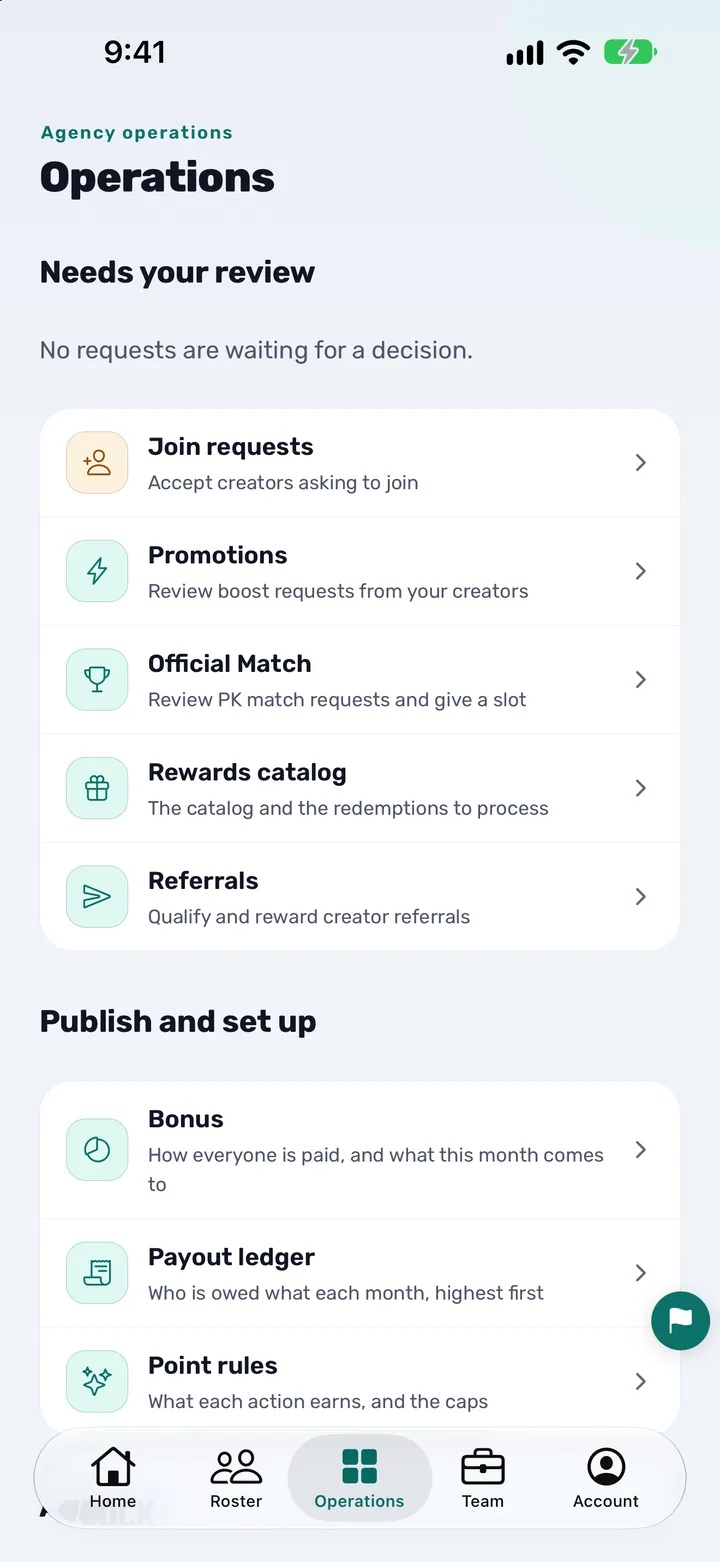
| Where it is in the app | Operations tab, under "Publish and set up": Bonus (how everyone is paid) and Payout ledger (who is owed what each month). |
| Who sets the rules | The agency owner. Only an owner can choose how the agency pays. |
| Two ways to pay | Pay rules follow either the levels or the diamonds. |
| Checked before saving | The rules are priced on three creators from the agency's own roster: a lowest month, a typical month and a top month, updated as the owner changes them. |
| A creator with their own deal | The owner can give one creator a fixed share as an exception to the rules. |
| The record | A payout ledger for each month: who is owed what, highest first. A dash means a creator has not been priced yet, never zero. |
| What a creator sees | My Bonus: their level, their share and how this month is worked out under the agency's formula. |
| Who sees pay | Set per person: nobody's, their own book's or everyone's. |
| Money | The app never takes, sends, holds or processes money. The agency pays outside the app, the way it already does. |
What the owner sets
CN Creator App does not come with a pay rate. It gives the owner four things to set, and the agency's own numbers go into each of them.
- Levels. The app uses five activeness levels, and TikTok fixes the gate for each one (valid days and LIVE hours). The owner sets what each level pays, and an extra for a creator who holds a level or climbs one.
- Pay rules. One rule at a time. A rule takes a percentage of a figure the app has read, such as diamonds. The percentage can be one the owner types or one that follows the creator's level. Each rule can be limited to creators who clear a condition: a diamond floor or ceiling, valid days, LIVE hours, a minimum level, or whether they held or climbed a level. Any rule can be switched off to stop counting it.
- Levels or diamonds. Pay rules follow either the levels or the diamonds. The owner picks the way the agency already pays.
- Exceptions. A creator on a separate deal can be given a fixed share that replaces the rules for that creator only.
An example of the shape of a rule, not a rate: pay a percentage of diamonds, only to creators who cleared the valid-days gate and reached a level the owner names. Every figure in a rule is the owner's.
Beside the rules, the screen restates them in plain words, so the owner can tell the team how the agency pays. If two rows overlap it says so and offers to make them exclusive.
How an owner sets the rules
- Open Bonus. In the app, open Operations and, under "Publish and set up", tap Bonus. It is headed "How you pay".
- Choose how you pay. Pay rules follow either the levels or the diamonds. Pick the way the agency already pays.
- Start from a preset, or your own arrangement. A preset is only a starting point. Change what you like before you save.
- Set the shares and the rules. On the levels screen, set what each of the five levels pays. On the Bonus screen, add the pay rules one by one, with the conditions each one needs.
- Try it on three creators. Watch what a lowest month, a typical month and a top month from your own roster would get, and change a rule until it says what you mean to pay.
- Save. Saving applies the rules to every creator from the next read of the figures. Creators see how their own month is worked out in My Bonus.
- Read the payout ledger each month. Open Payout ledger, under "Publish and set up", to see who is owed what for the month, highest first, and pay people the way the agency already does.
See what a rule pays before you save
While the owner changes the rules, the Bonus screen shows what each of three creators from the agency's own roster would get this month: the lowest month, a typical month and the top month. The figures change as the rules change, so a rule that pays too much, or nothing, shows up before any creator sees it.
Prices appear once the first read of the roster has arrived. Until a creator's figures have been read, the screen says "not priced yet" and never shows a zero.
The payout ledger
Every month, the app works out what each creator is owed under the rules and lists it in the Payout ledger: who is owed what, highest first. The owner steps back and forward between months.
The current month moves with every read until the month closes, and a closed month settles around the 10th of the month after. A dash beside a creator means they have not been priced yet, which is different from being owed nothing.
Adjustments and event rewards are listed in the ledger too. Staff see it only when the owner has enabled payout access for their role.
The ledger is a record, not a payment. The agency pays outside the app, by bank transfer, wallet or whatever it already uses, and the app has nothing to send.
What creators and staff see
A creator opens My Bonus and sees their level, their share and how this month is worked out. It is the agency's formula, not a generic one, and nothing about any other creator.
An owner who rewards creators another way can switch off "Show Bonus to creators", and creators then see no Bonus figure, share or estimate.
Whether a member of staff sees pay at all is set per person: nobody's, their own book's or everyone's.
How it differs from a spreadsheet, WhatsApp and notes
Many agencies keep their pay rules in a formula tab, in a WhatsApp message or in somebody's notes. CN Creator App puts the rules on one screen the owner can read in plain words.
| Task | Spreadsheet, WhatsApp or notes | CN Creator App |
|---|---|---|
| Where the rules live | In a formula tab, a message or somebody's notes | On one Bonus screen, restated in plain words |
| Checking a change | Found out when the month-end figures look wrong | Priced on three creators from the roster as you change the rule, before you save |
| A creator with a separate deal | A note nobody can find | An exception set on that creator |
| What the creator is told | A message that may differ from the sheet | Their own My Bonus screen: level, share and how it is worked out |
| Who sees pay | Whoever has the file or the chat | Set per person |
| The record for the month | A new tab or a long chat history | A payout ledger for each month; a creator not yet priced shows a dash, not zero |
What it is not
- Not a calculator. It does not tell an agency what to pay and it states no rate of its own. Every percentage comes from the owner.
- Not a payment service. It never takes, sends, holds or processes the money between an agency and its creators, and it links to no payment provider for it.
- Not a violation tracker. It does not detect TikTok violations or deduct penalties. A creator can raise a problem with their agency as an appeal.
- Not a TikTok product. It is made by an official TikTok LIVE agency partner and works with the agency's own Backstage account. TikTok and TikTok LIVE are trademarks of ByteDance Ltd.
Questions agency owners ask
Can I set my own pay rules for my TikTok LIVE agency?
Yes. In CN Creator App the owner sets what each level pays and builds the pay rules one at a time, starting from a preset or from the agency's own arrangement. The app shows the result worked out on real creators before anything is saved, and every month lands in a payout ledger. The app never moves the money.
Does CN Creator App have a fixed pay rate or formula?
CN Creator App has no fixed pay rate. Presets are starting points the owner changes, and every percentage in the agency's rules is the owner's choice. It is not a calculator and it does not say what TikTok pays.
How do creator levels work in CN Creator App?
The app uses five activeness levels. TikTok fixes the gate for each level, which is a number of valid days and LIVE hours. The owner decides what each level pays, plus an extra for a creator who holds a level or climbs to the next.
Can I pay by level or by diamonds?
Yes. Pay rules in CN Creator App follow either the levels or the diamonds, and the owner picks the way the agency already pays.
Can I see what a rule pays before creators do?
Yes. While you change the rules, the Bonus screen shows what three creators from your own roster would get this month: a lowest month, a typical month and a top month. Nothing applies to anyone until you save, and saved rules apply from the next read of the figures.
Can one creator have a different deal from everyone else?
Yes. The owner can give one creator a fixed share as an exception. It replaces the agency's rules for that creator only.
What is the payout ledger?
The payout ledger lists, for each month, what every creator is owed, highest first. The current month keeps moving until it closes, and a dash means a creator has not been priced yet, not that they are owed nothing.
Does the app pay my creators?
CN Creator App never takes, sends, holds or processes money. It works out what each creator is owed and keeps the record, and the agency pays outside the app, the way it already does.
Can I hide pay from my agents?
Yes. Whether a member of staff sees pay is set per person: nobody's, their own book's or everyone's. Staff also need payout access, which the owner enables for their role, to open the payout ledger.
What do my creators see of the rules?
Each creator opens My Bonus and sees their own level, their own share and how this month is worked out under your agency's formula. They see nothing about any other creator, and an owner can switch the Bonus off for creators entirely.
What if my agency pays in a way the Bonus screen cannot express?
Tell support how the agency pays, at creatorapp@devignlb.com. A person answers, and the team will help you build it so that your creators see the right formula.
Is CN Creator App an official TikTok product?
No. It is made by an official TikTok LIVE agency partner, but CN Creator App is not a TikTok product. It reads the agency's own Backstage account on the agency's behalf. TikTok and TikTok LIVE are trademarks of ByteDance Ltd.