
Backstage data
Track your TikTok LIVE Backstage data without exporting it
If you copy your creators' numbers out of TikTok LIVE Backstage or export them to a spreadsheet every month, you can stop. The agency connects its own Backstage login once. CN Creator App signs in on the agency's behalf, reads the roster and each creator's monthly figures, and keeps them up to date. It reads only what the agency's own Backstage account already shows. It does not post, message or change anything on TikTok.
Ready to connect? The setup steps and fixes are in the Connect Backstage guide
On this page
Below, for CN Creator App (formerly Devign Agency Suite): exactly what is read and what is not, how this compares with exporting by hand, how the app behaves when a figure is missing or a login stops working, and the limits you should know before you connect.
What is read, and what is not
| Question | Answer |
|---|---|
| Read from Backstage | The agency's roster, and for each creator and each month: diamonds, diamonds from matches, valid days, LIVE duration, the number of LIVEs, new followers, PK matches, and TikTok's estimated bonus and bonus contribution. |
| Never done | It does not post, send messages, change a setting or buy anything in Backstage. A creator's personal TikTok account is never connected and never asked for. |
| Where it comes from | The agency's own Backstage account, read-only. This is not an official TikTok API. |
| How often | The first read starts on its own. After that, automatically, on a regular schedule. |
| A figure that was not read | Shown as a dash, never as a zero. |
| Whose login | The agency owner's Backstage login lets the app see every creator. An agent's login only sees that agent's creators, and each member of staff can connect their own. |
| The login itself | Stored encrypted, never shown back on any screen, and deleted when you disconnect. |
| Several markets | Each market is its own workspace with its own roster and its own Backstage login, switched from one account. |
Exporting by hand compared with a connected login
Both ways start from the same place: the figures your agency's Backstage account already shows. The difference is who moves them into a usable form each month, and how old they are when you look.
| Topic | Export and retype each month | Connect once |
|---|---|---|
| Getting the figures in | Someone signs in to Backstage, exports or copies the numbers and pastes or retypes them into a spreadsheet. | The app signs in on the agency's behalf and reads them on a regular schedule. |
| The roster | Kept by hand in the sheet. | Read from Backstage and kept in the app. Filter it, select creators in bulk and assign them to agents. |
| A missing number | A blank cell, or a zero typed by habit. | A dash, never a zero. |
| How old the numbers are | As old as the last export. | Each creator's month shows how long ago it was read. |
| Who sees what | Whoever you send the file to sees all of it. | Owner and agents see what the owner allows, pay visibility is set per person, and a creator sees only their own month. |
| What you still do | The export, every month. | Connect once, and reconnect if the login stops delivering. |
| What it depends on | Your own time, every month. | The Backstage login staying valid, and TikTok continuing to allow the access. |
The roster and the monthly figures
Once the login is connected, the roster is imported and read for you: every creator, their month and who looks after them. For every creator and every month the app keeps diamonds, valid days and LIVE duration, along with the other figures in the table above. An agency that already keeps its roster in a spreadsheet can also bring that roster in from an Excel or CSV file when it sets up.
The figures are the ones Backstage reports for your agency. The app is not a way to get figures an agency does not already have.
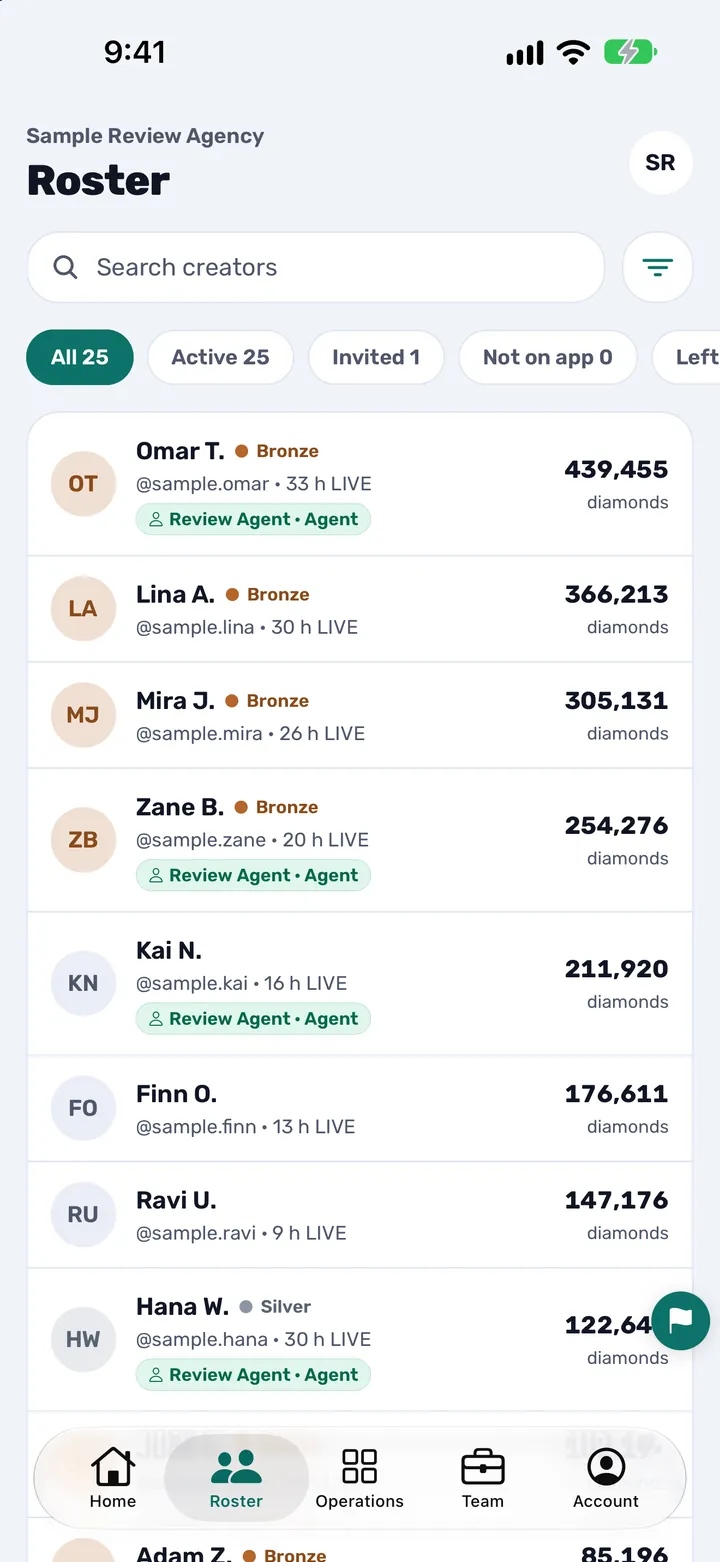
The Roster of a demo agency: each creator with their LIVE hours and diamonds.
A dash, not a zero
A spreadsheet cell left empty and a creator who really earned nothing look the same on screen. The app keeps them apart. A figure that has not been read shows as a dash, never as a zero, so a missing number is not mistaken for a result.
A read that did not reach most of the roster is thrown away rather than written, so a half-finished read never becomes a wrong number in a creator's month.
When the figures refresh
The first read starts on its own after you connect and may take a while. You can close the app while it runs, and a notification tells you when your creators are in. After that the figures refresh automatically, on a regular schedule.
If a read fails, the app tries again on its own: soon at first, and less often if it keeps failing. If TikTok asks for a verification code, the person whose login it is types the code into the app, and the read carries on.
If the login stops working or Backstage changes
A login can stop delivering for reasons only a person can fix: a password that was changed, a verification code nobody answered, or a connection that was never finished. When nothing has been read from a login for a while, the owner and the person who holds that login get a notification titled Reconnect TikTok Backstage, and the dashboard shows a reconnect banner. Until it is fixed the figures go out of date, which is why each creator's month shows how long ago it was read. Reconnecting is done in the app, and the Connect Backstage guide has a section for each problem.
The app reads Backstage on the agency's behalf and not through an official TikTok API. So a change on TikTok's side can interrupt the reading, and that is outside the agency's control and ours. When that happens the figures stop updating, and nothing is invented to fill the gap.
Limits to know before you connect
- It only reads. It never posts, changes or buys anything on TikTok.
- It is not an official TikTok API, and it is not a TikTok product. It is made by an official TikTok LIVE agency partner and TikTok has not endorsed it.
- It signs in to Backstage on a schedule, and TikTok's own systems record that as a sign-in like any other (Terms of Service, section 8.1).
- Whether your agreement with TikTok allows a connected service is the agency's decision. Connecting means the agency confirms it is entitled to (Terms of Service, section 8.3), so check your agreement first.
- If TikTok objects to the connection or restricts or removes your access, the app stops reading (Terms of Service, section 8.3).
- It cannot show figures your agency's Backstage account does not have.
- It does not detect TikTok violations, and it never takes, sends, holds or processes money. It works out what each creator is owed under rules the owner sets and keeps a record, and the agency pays people the way it already does.
Where your login is kept
The agency's Backstage login is stored encrypted and is used only to sign in to that same agency's Backstage. No screen shows it back. It is decrypted only to sign in on the agency's behalf, and every decryption is recorded. You can remove it at any time with Disconnect on the Backstage screen in the app, and the stored login is deleted when you do. Each agency's data is kept separate from every other agency's. The Privacy Policy sets out the details.
Connect once: the three steps
This is the short version. The Connect Backstage guide has the full steps, what to have ready and what to do if TikTok says no.
- Choose your region. Open your agency in the app and pick the region your Backstage account belongs to. If you pick the wrong one, the app moves your agency to the right region after connecting.
- Enter your Backstage login. Type the email and password your agency uses at live-backstage.tiktok.com, which is not your TikTok app login, and say whether Backstage sends you a code when you sign in.
- Let the first read finish. This can take a few minutes and you can close the app while it runs. A notification tells you when your creators are in, and from then on the figures refresh on their own.
Questions agency owners ask
Can I stop exporting TikTok Backstage data into a spreadsheet every month?
Yes. The agency connects its own Backstage login to CN Creator App once, and the app reads the roster and each creator's monthly figures on a regular schedule, so there is nothing to export or retype. Reconnecting is only needed if the login stops working.
What does CN Creator App read from my Backstage account?
It reads the agency's roster and, for each creator and each month, diamonds, diamonds from matches, valid days, LIVE duration, the number of LIVEs, new followers, PK matches, and TikTok's estimated bonus and bonus contribution. It reads nothing that the agency's own Backstage account does not already show.
Can CN Creator App change anything in my Backstage account?
No. It only reads. It never posts, sends messages, changes a setting or buys anything in Backstage, and a creator's personal TikTok account is never connected.
Is CN Creator App an official TikTok API?
No. It signs in to the agency's own Backstage account on the agency's behalf and reads the figures, and that is not done through an official TikTok API. CN Creator App is made by an official TikTok LIVE agency partner, but it is not a TikTok product and TikTok has not endorsed it.
How often are the figures updated?
The first read starts on its own after you connect. After that CN Creator App refreshes the figures automatically, on a regular schedule.
What does a dash instead of a number mean in CN Creator App?
It means that figure has not been read. CN Creator App shows a dash and never a zero, so a missing number is not mistaken for a creator who earned nothing.
What happens if my Backstage login stops working?
When nothing has been read from a login for a while, the owner and the person who holds that login get a Reconnect TikTok Backstage notification, and the dashboard shows a reconnect banner. Until it is reconnected the figures go out of date, and each creator's month shows how long ago it was read.
What happens if TikTok changes Backstage?
A change on TikTok's side can interrupt the reading, because CN Creator App reads Backstage on the agency's behalf and not through an official API. When that happens the figures stop updating and nothing is invented to fill the gap. A read that did not reach most of the roster is thrown away rather than written.
Is it allowed to connect a service like this to Backstage?
That is the agency's decision. Whether your agreement with TikTok allows a connected service is for your agency to check before connecting, and by connecting the agency confirms it is entitled to (Terms of Service, section 8.3). If TikTok objects or restricts access, CN Creator App stops reading.
Is my Backstage password safe, and can I remove it?
CN Creator App stores the login encrypted and no screen shows it back. You can remove it at any time with Disconnect on the Backstage screen in the app, and the stored login is deleted when you do.
Does the owner or each agent connect a login?
The agency owner's Backstage login lets CN Creator App see every creator. An agent's login only sees the creators TikTok assigned to that agent, and each member of staff can connect their own login.
Can I track several markets in CN Creator App?
Yes. Each market is its own workspace with its own roster and its own Backstage login, switched from one account.
Can I bring my existing roster in from a spreadsheet?
Yes. When an agency sets up, CN Creator App can bring the roster in from an Excel or CSV spreadsheet. The monthly figures themselves come from the agency's Backstage account.
Related pages
- Connect Backstage: the steps and the fixes
- What is CN Creator App?
- How a TikTok LIVE agency runs on CN Creator App, day by day
- What CN Creator App does, feature by feature
- The TikTok LIVE agency management app
- Level and pay rules for a TikTok LIVE agency
- How to start a TikTok LIVE agency
- Privacy Policy
- Terms of Service
- The full plain-text reference (llms-full.txt)